


HCMToGo
3.64.28K Reviews
App Specs
- Version
- 1.106.5
- Updated On
- License
- Free
- Downloads
- 1,000,000+
- Developer
- Workforce Ready
- Categories
- Business
- Platform
- Android, iOS
Screenshots
 Analysis by AppCompare
I tend to judge a workplace app by what it helps me get done before a shift, during a busy day, and when I need to check something after work. HCMToGo is aimed at that practical side of working life: it brings workforce and HR tasks onto a phone rather than leaving every check to a desktop or a conversation with a manager. For employees, the appeal is quick access to work information; for managers, it can make routine coordination easier. It is most useful when an employer already uses the system behind it, so I would first check whether my workplace supports it.
A sensible place to start each day
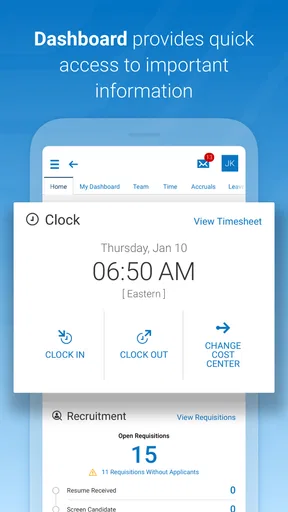
My baseline routine would be simple: open the app before heading in, check the schedule, and look for any notice that could change the plan. If time tracking is available for my employer’s setup, I would use the same routine to handle clock-in or clock-out rather than relying on memory later. That small habit matters more than trying to explore every screen on the first day: it gives the app a clear job and helps me catch a mismatch while there is still time to ask about it.
For example, imagine I am due to work an evening shift and need to know whether the start time has changed. Checking the schedule on my phone before leaving home is more useful than discovering the change after arriving. If I then record my time through the app, I can make a habit of checking that the action registered before putting my phone away. I would still follow my employer’s instructions for timekeeping, but a consistent routine makes it less likely that I forget a step in the rush.
Settings and habits worth checking
I would spend a minute reviewing the app’s available notification settings, especially if shift updates or work reminders are important to me. Notifications are helpful only when they are noticeable without becoming noise. If alerts are easy to miss among personal messages, I would adjust the phone’s notification behavior where available and make a quick manual schedule check part of my morning routine. I would not assume that every employer configures the same alerts or exposes the same options.
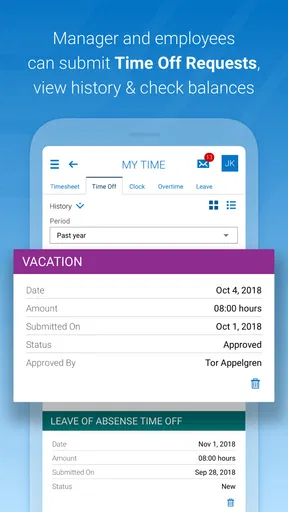
It is also worth checking that the account is connected to the right workplace and that the information shown matches what a manager has communicated. If a schedule, time entry, or payroll-related detail looks wrong, I would note the specific item and raise it through the channel my employer expects. A mobile view can help me spot a question; it does not automatically settle a payroll or attendance dispute. That distinction keeps the app useful without treating it as the final authority on every workplace issue.
Faster patterns for repeat tasks
The best shortcut here is a repeatable order, not an assumed hidden feature. I would check the schedule, handle the timekeeping action I need, then review notifications before closing the app. Keeping those checks together reduces the chance that I remember one task and forget another. On a workday when nothing has changed, the routine stays brief; when an alert appears, I can deal with it while I am already looking at work details.
Managers can use a similar pattern before a shift: review the day’s schedule, check for messages that need attention, and then follow up with the relevant person if something does not line up. I would avoid using an HR app as a substitute for a direct conversation when a change affects someone’s hours or responsibilities. The app can put work information in one place, but a clear message from a manager is still the better choice when context or confirmation matters.
Worth Reading Before You Choose

EA SPORTS FC Mobile 26 Is a Bigger Football Game, but It Takes Time

Flipboard Shows What News Apps Must Do Beyond the Feed

Switching to Android Auto Means Rethinking Your Driving Routine

Google Calendar Makes a Crowded Week Easier to Manage

Ludo King Makes the Most of the Minutes Between Plans

Baby Panda World Brings Quick Play to Modern Phones, but Its Game Library Feels Busy
Where it fits—and where it does not
This is a business app from Workforce Ready, and that focus shapes who is likely to benefit. Employees who need to check work details on the move may find it more convenient than waiting to use a shared computer or asking a coworker to look something up. Team leads may appreciate having workforce tasks close at hand. By contrast, someone looking for a general calendar, personal task manager, or independent payroll service should choose a tool built for that purpose; this app is tied to an employer’s workplace setup rather than being a standalone organizer.
Compared with a basic calendar, it is intended to connect work-related information and actions rather than just display events. Compared with asking a manager for every schedule check, a mobile app can save a step when the answer is already available there. But it is not a replacement for an employer’s formal HR process, and I would not rely on it to resolve a complicated pay question without checking with the appropriate person. The convenience is real, but it depends on how the organization has configured and adopted the system.
Practical limits to keep in mind
The experience can vary according to what an employer makes available, so I would not assume every user sees the same tools or information. That is especially important for new employees: if a feature seems missing, I would ask whether it is enabled for my role before concluding that the app is broken. Likewise, if a record looks incomplete, I would compare it with the workplace’s normal process and ask for clarification rather than repeatedly refreshing or entering the same information.
There is also a trade-off in putting work tasks on a personal phone. It can be convenient to check a shift quickly, but I would decide how much work notification activity I want outside my working hours and use the phone’s available controls to keep it manageable. If I prefer to keep work and personal devices separate, or if my employer’s workflow depends on a desktop process, the mobile app may be a companion rather than the main way I handle HR tasks.
On the app-store side, it is free and rated for Everyone, with an average rating of 3.6 from around 11,000 ratings. It has over a million installs, which suggests that it is used across many workplaces, though that does not tell me whether my own employer has configured it well. The rating is a reminder to keep expectations practical: I would judge it by whether my organization’s schedule, timekeeping, and communication routines work smoothly in my day-to-day use.
First Impressions
So, let's get real. The first thing that caught my eye when I opened HCMToGo was its sleek interface. It’s like the app designers knew exactly what they were doing. No clutter, just straight-up functionality. You know how some apps just make you feel overwhelmed with buttons and options? Not here. Everything is laid out neatly, and it’s super intuitive. Even if tech isn’t really your thing, navigating through this app is a breeze.
Features That Stand Out
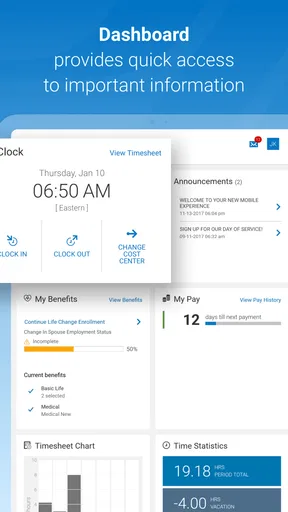
Alright, let's talk features because that's what we're really here for, right? One of the coolest things about HCMToGo is how it handles time management. Whether you’re clocking in or checking your schedule, it’s all just a tap away. It’s like having a mini HR department in your pocket.
Another feature that’s worth mentioning is the notifications. I mean, who doesn’t love a good reminder? Whether it's a schedule update or a task that needs your attention, the app gives you a nudge, so you’re always in the loop. And let’s be honest, we could all use a little reminder now and then, am I right?
Why It’s a Game-Changer
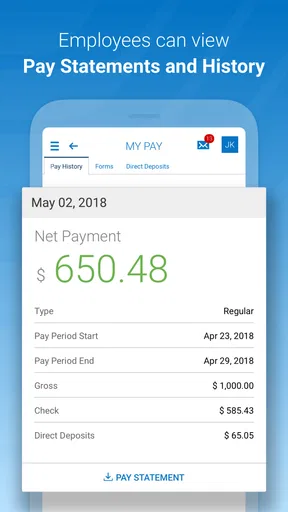
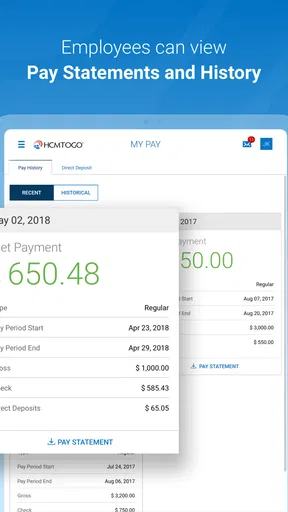
Okay, so here’s the thing that really makes it shine: it’s all about making your work life easier. The integration with payroll and attendance is seamless. No more stressing about whether your hours were logged correctly or if your paycheck will reflect the overtime you pulled last week. It’s all there, and it’s all accurate.
And let's not forget about the communication tools. Need to send a quick message to your team? Done. Want to check on a project’s progress? Easy peasy. It’s like having an office chat app, but better because it’s all integrated with the other HR functions you need.
Who Will Love This App?
If you’re in HR, this app is like a dream come true. But honestly, anyone who’s part of a team or manages people can find value here. It’s especially great for remote teams. With more folks working from home, having everything you need right on your phone or tablet is a massive win. You can keep everything on track without being chained to a desk.
Final Thoughts
So, what’s the final verdict on it? Honestly, it’s a solid choice for anyone looking to streamline their workforce management. It’s user-friendly, packed with features, and just plain useful. If you’ve been searching for a way to make your work life a little less hectic, give it a shot. You might just find it’s the app you never knew you needed.
HCMToGo is a modern version of TotalHRWorks Mobile App, and its current version is 1.104.5. It was released on March 27, 2018, and requires iOS 11 or later. I would still check the compatibility details for the device I plan to use before installing it, particularly if I rely on an older phone.
And there you have it! If you’re ready to take the plunge, you can find download links right here on our site. Happy organizing!
Pros
- User-friendly interface with intuitive navigation.
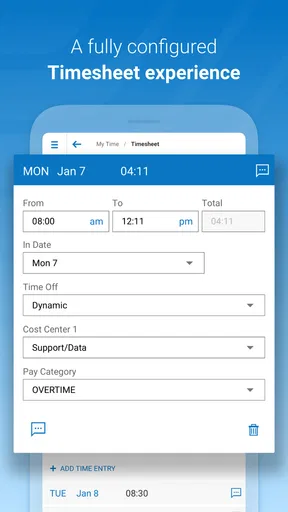
- Efficient time tracking for employees.
- Real-time updates and notifications.
- Comprehensive payroll management tools.
- Customizable for various business needs.
Cons
- Limited offline functionality.
- Occasional sync issues reported.
- Requires regular updates for best performance.
- Initial setup can be time-consuming.
- Some features may require additional fees.
FAQs for HCMToGo
What is HCMToGo and what does it offer?
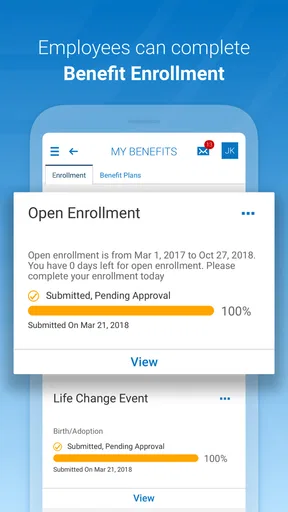
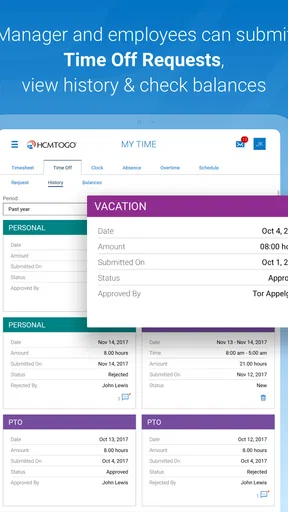
HCMToGo is a comprehensive mobile application designed for workforce management. It offers features like time tracking, scheduling, and payroll management, making it easier for employees and managers to handle HR tasks on the go. The app integrates seamlessly with various HR systems, providing a convenient solution for both small and large organizations.
Is HCMToGo compatible with both Android and iOS devices?
Yes, HCMToGo is available for download on both Android and iOS platforms. This ensures that users can access the app regardless of their device preference. The app is optimized for both operating systems, providing a smooth and consistent user experience across different devices.
How secure is the HCMToGo app in handling sensitive employee data?
HCMToGo prioritizes data security and employs robust encryption protocols to protect sensitive employee information. The app complies with industry standards and regulations, ensuring that all data transmissions are secure. Users can rest assured that their personal and organizational data is safeguarded against unauthorized access.
Can employees clock in and out directly from the HCMToGo app?
Yes, employees can easily clock in and out using the HCMToGo app. This feature supports various clocking methods, including GPS and biometric verification, providing flexibility and accuracy. It helps organizations track work hours efficiently, reducing the need for manual timekeeping processes.
Does HCMToGo require an internet connection to function?
While an internet connection is necessary for real-time data synchronization and updates, HCMToGo offers offline capabilities. Users can perform certain functions, such as clocking in and out, without an active internet connection. The data will automatically sync once the device reconnects to the internet, ensuring seamless functionality.


